Sunday, December 6

The Microsoft Meet Now functionality

 I completed Windows Update in my computers and saw the new "Meet Now" button in the system notification area:


I tried it, and it is very convenient to create a meeting with friends. One friend actually joined using a MacBook, and this web-based online meeting is working well for her too.


Microsoft is using this button to utilize Skype for the online meeting, to compete with ZOOM. Skype is already installed in every Microsoft Windows computer, by default, but it requires an account to perform the task. Not everyone wants to jump through all the hops to use it, even though it is actually very useful. Skype has the best sound quality several years ago before I stopped using it. 


Anyway, now Microsoft forcefully (carefully, quietly) added this functionality in every Windows desktop to enable instant website online meeting without requiring registration overhead. That is a smart move. 


Labels:

Tuesday, October 11

Secure delete (Windows)

在操作系统里,文件删除后,并且从垃圾桶里清空之后,文件所在的页面被标为“可用”(unused),待下次有文件写入需要这个空间的时候,这个页面才会被改写:所以说,这时候这“已删除文件”并没有真正被删除。

好处:如果你反悔,有可能能把这些文件内容找回来。


如果你真的要删除这些文件,把这些文件内容彻底改写,在Windows环境可以使用微软出品的 sdelete (Secure Delete). 它把所有unused的页面都写上0,那些“已删除文件”被彻底抹掉:
 sdelete -cz C:  
在Linux 环境下可以用dd生成极大的文件(内容都是0)充满整个硬盘,把所有“可用”(unused)页面都用起来,然后把这个文件删除掉(scrub能做完这个事情)。

好处:1,硬盘这些空间都写上电荷0,可以减轻重量,减少环境污染。
2,如果你这个环境是一个虚拟环境(virutal machine),比如VirtualBox 或者Vmware, 而且你的虚拟硬盘是动态分布的,那么在做完这个操作,把未用空间都填0之后,在host环境可以把这些未用空间收回来,缩小这个虚拟硬盘的实际大小(它的最大空间不变,随着你以后写入文件,它的实际尺寸以后还会长大)。

用VirtualBox的话,命令是:
VBoxManage modifyvdi xxxx.vdi --compact


附注:FBI有一些硬盘探测工具能够读取硬盘磁道的残留信息,找出该扇区在被改写之前的字节,以及在那之前的字节,以及...。即使在用sdelete的时候可以用 -p 来指定写入的次数(比如说,一百次?),也不能保证你的数据百分百没有被读出的可能。

Labels: ,

Friday, March 11

DateTime.Kind, and SetLastModified problem (C#)

I'm using Response.Cache.SetLastModified to set the time of last modified entry in the database to the affected webpage, so that web browser knows when to cache and when to refresh for new page.

The SetLastModified gives "ArgumentOutOfRangeException" because it thinks the given time is newer than current time, and that is not allowed. The problem is, the given time was saved into database 2 minutes ago, how can it be greater (newer) than current time? I checked the sql server which is sitting in another server, and figured out they are using the same time, same timezone. The database time entry was saved as "LastModDateTimeGMT=getutcdate()".


After carefully checking all the possibilities (that means 2 hours), I focus on the DateTime.Kind property. When the DateTime entry is retrieved from database
DateTime LastModified = (DateTime)(row["LastModDateTimeGMT"])

The value of LastModified has the value of UTC time (that means 7PM, when it is 12PM local time), and the LastModified.Kind is "Unspecified".

DateTime.Kind property tells us, when the .Kind value is "Unspecified", you can call .ToLocalTime() to get LocalTime, assuming the current value is in UTC, or you can call .ToUniversalTime() to get UTC time, assuming the current value is in Local. So, in my case, SetLastModified(LastModified) calls the LastModified.ToUniversalTime() and gets 2PM of tomorrow, when this time is compared with the current time (7PM UTC, 12PM local), it prompts error because the given time is newer than current time.

After setting the .Kind to the UTC because I know the datetime in database is in UTC:
DateTime LastModified = (DateTime)(row["LastModDateTimeGMT"])
LastModified = DateTime.SpecifyKind(LastModified , DateTimeKind.Utc);
everything is good.

So the error actually comes from Sql Server: When a datetime is saved, there is no way to know what timezone it is in:
Time zone offset aware and preservation No
Daylight saving aware No
(datetime (Transact-SQL))
So C# can only give "Unspecified" to the .Kind value when the value is retrieved.

The "Unspecified" is a very dangerous status. The system (or the Microsoft Programers) tries very hard to guess what timezone that is or what timezone you want to have and gives you a wild guess result. Each time you retrieve a datatime from database or from other sources, you should always specify a .Kind for it to prevent this kind of uncertainty.

Another suggestion is: Always use UTC time (getutcdate) in database and in programing, so that you don't have trouble if your server is physically moved into to another timezone, or your program is deployed by another team that you don't know where they are.

Note: By default, the "Cache-Control" is "Private". In this status, the Response.Cache.SetETag will fail. There is no ETag output to client. So Response.Cache.SetCacheability(HttpCacheability.Public or PublicOrPrivate); must be enforced before setting ETag.

Labels: ,

You saved my time, thanx
 

Thursday, February 19

Installing VMWare Player

I installed 2 virtual systems in my Windows this month. It is simpler than I thought.

VMWare is the most reputable virtual system software. VMWare Player provides the basic functionality and it is free. So it is the best tool for us.

The whole process is quite straightforward: You let the VMWare Player know where is your virtual harddrive, and where is your virtual CD which is the OS installation CD. Then start VMWare Player, and it will run the OS installation from CD into harddrive, acts like real CD and real harddrive.

The first step, of course, is to visit VMWare to download and install VMWare Player.

Then, you need to get QEMU to create a virtual harddrive image:
qemu-img.exe create -f vmdk newsystem.vmdk 20G

It will create a file newsystem.vmdk, which can grow up to 20 Giga Bytes when you fill up the harddrive in the Virtual Operating System.
You can also download such image files from some websites. I prefer to create it myself.

Now, we create a text file to let VMWare Player know our hardware setting:

#filename: newsystem.vmx
config.version = "8"
virtualHW.version = "3"

#this is harddrive setting
ide0:0.present = "TRUE"
ide0:0.filename = "newsystem.vmdk" #The virtual harddrive image we just created.
ide0:0.redo = ""

#Memory
memsize = "2048" #2 Giga Bytes of memory. Modify it to fit your need.
MemAllowAutoScaleDown = "FALSE"

#Virtual CD
ide1:0.present = "TRUE"
ide1:0.autodetect = "TRUE"
ide1:0.startConnected = "TRUE"
ide1:0.fileName = "os.iso" # can be ubuntu-8.10-install-i386.iso or WinXP.iso or whatever OS you want to install.
ide1:0.deviceType = "cdrom-image"
#if you want to use the real CD, you can modify the previous 2 lines as:
#ide1:0.fileName = "auto detect" # or "D:"
#ide1:0.deviceType = "cdrom-raw"
# or "atapi-cdrom" or "dvd-raw" for DVD drive


# Other hardwares
floppy0.present = "FALSE"
ethernet0.present = "TRUE"
ethernet0.addressType = "generated"
ethernet0.generatedAddress = "00:0c:29:7e:06:58"
ethernet0.generatedAddressOffset = "0"
ethernet0.virtualDev = "e1000"

usb.present = "TRUE"
sound.present = "TRUE"
sound.virtualDev = "es1371"
uuid.location = "56 4d 5c cc 3d 4a 43 29-55 89 5c 28 1e 7e 06 58"
uuid.bios = "56 4d 5c cc 3d 4a 43 29-55 89 5c 28 1e 7e 06 58"

#title
displayName = "NewOS"
guestOS = "winnetenterprise" # Current OS (host) you are using. "ubuntu" if you are using gedit/vi.
nvram = "NewOS.nvram"

#others
MemTrimRate = "-1"
tools.syncTime = "TRUE"
uuid.action = "create"
checkpoint.vmState = ""


Now save and double click the newsystem.vmx to activate VMWare Player. It will detect virtual harddrive (newsystem.vmdk) and virtual CD (os.iso). Because the os.iso is bootable, the Virtual system will be boot up and installed. Isn't that easy!


BTW: I just installed a virtual system in my Ubuntu. The process is the same as installing it in Windows.

If you add
ethernet0.connectionType = "nat"

into the .vmx file, the virtual system will get an IP address from the host to form a local network.

Labels: ,

Tuesday, September 25

Create an Exchange Calendar event using ASP

In one ASP program, registered user can write an event into internal Exchange Calendar.

'Set Appointment
Dim objAppt
Dim Conn
Set objAppt=CreateObject("CDO.Appointment")
Set Conn=CreateObject("ADODB.Connection")
Conn.Provider="ExOLEDB.Datasource"
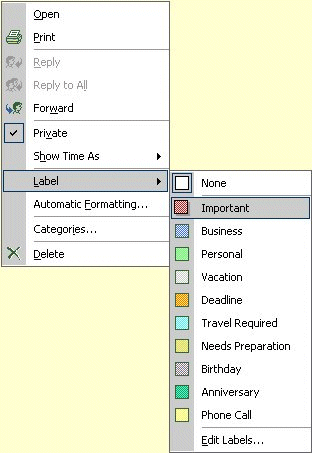
LabelColor = 4 ' can be 0-10. 0 is white.
With objAppt
.StartTime = month &"/" & day & "/" & year & " "& hour & ":" &
minute & ":00 " & AMPM
.EndTime = appointmentEnd
.Subject = subject
.Location = address
.TextBody = description
.Fields("http://schemas.microsoft.com/mapi/id/
{00062002-0000-0000-C000-000000000046}/0x8214").Value =
clng(LabelColor)

.fields.update

CalenderSelector = "http://localhost/public/daily schedule/"
if (subject = "AAA") then
CalenderSelector = "http://localhost/public/special schedule/"
end if

Conn.Open CalenderSelector
.DataSource.SaveToContainer CalenderSelector, Conn
End With

'Cleanup
Set objAppt=Nothing
Set Conn=Nothing


There are two tricks in the code:
1, Define the color of label. You can modified the line "LabelColor = 4" to whatever you like. Value of the LabelColor can be any number between 0 and 10, and the result appointment will have different color respectfully. The method is undocumented. Make sure you use "Clng" to cast the value into long integer.

2, You can write to different calendar by using the CalendarSelector.

Labels: ,

白写了,现在都.net了。里面的日历比你自己写的好用很多。你彻底落伍了。。。
 
前人留下来的程序,能够添加一个日历事件。我就在上面加上Label。我这里还有许多很古怪的垃圾程序...
 

Saturday, June 23

Tricky Microsoft

I havn't updated one of my computers for a while. Today when I ran the Microsoft Update, I got prompted to install the latest version of "some Windows components" so that I could get more updates and faster delivery. And, that is a "must". So I clicked OK, and the Microsoft Update started to download this critical update: Windows Genuine Advantage Validation Tool.

Everyone knows that Windows Genuine Advantage Validation Tool is to verify whether my computer is running genuine Windows or not. I actually understand that Microsoft only provide services for genuine Windows users. I don't mind to install WGA, but I am not happy because Microsoft tricked me into installing it without my admission.

Labels: , ,

grow up
 

Friday, May 18

Messy MSDN help

Today the messy MSDN wasted me 1 hour.

By somehow I know there is a setting in the web.config to setup requestPriority as "Normal", "High", or "Critical". If it is set as Critical, the IIS Web server will server HTTP request in high priority, ignore other tasks. Because the server I am using is designed for IIS Web server solely, setting this value can help improving the performance.

But after I deployed this web.config, when I open IIS property of this website, I got error message:
Unrecognized attribute 'requestPriority'. Note that attribute names are case-sensitive.
So in Visual Studio 2005, I selected this keyword and hit F1--This is the way you get help from MSDN Library. I was directed to a help document:
.NET Framework General Reference
httpRuntime Element (ASP.NET Settings Schema)


....

requestPriority:

Optional HttpRequestPriority attribute.

Specifies the priority of all incoming requests to this application.

This attribute can be one of the following possible values.

Value Description

Critical

Specifies that a request is not subject to rejection, if the managed application queue is full. However, the request will be rejected, if the ISAPI threshold has been exceeded. The request is inserted at the end of the high priority queue, which is serviced before the normal queue.

High

Specifies that a request is subject to rejection, if the application queue is full. If the queue is not full, the request is inserted at the end of the high priority queue, which is serviced before the normal queue.

Normal

Specifies that a request is serviced as it normally would be, without elevated priority. This is the default.

This attribute is new in the .NET Framework version 2.0.

The default is Normal.

And there is default configuration for the httpRuntime element:
< httpruntime
executiontimeout="110">
...
requestPriority="Normal"
...
apartmentThreading="false"

/>
So I copy/paste the keyword and check it twice since the IIS mention "case sensitive". It didn't work. The document says this attribute only works for .NET Framework 2.0, so I double checked the ASP.NET version: 2.0.50727. I actually changed it to .NET 1.0, which apparently a wrong option, then changed it back. Same situation.

I had to Google for 15 minutes, until I found a simple reply in a news group:
Development Tray
Hello.

How can I to set requestPriority to "Critical" for an specific page in ASP.NET 2.0?

Thank you.

Author
26 Mar 2006 8:19 PM
Juan T. Llibre
requestPriority was killed after Beta 1.
If it is "killed", why is it shown in my MSDN Library? I searched keyword httpRuntime from the MSDN, came to an online help document with the same title:
.NET Framework General Reference
httpRuntime Element (ASP.NET Settings Schema)


....
In this document it doesn't mention requestPriority. But in the "default configuration " section, the "requestPriority" is still there:
< httpruntime
executiontimeout="110">
...
requestPriority="Normal"
...
apartmentThreading="false"

/>
Now I believe Microsoft actually canceled "requestPriority". But it forgets to delete it from the MSDN Library (The Visual Studio 2005 and MSDN I have is NOT Beta!), and it decided not to mention this keyword at all: It would be better if it lists this keyword and mention it is deprecated after 2.0.6xxx... And then it makes a mistake not to remove it from the default configuration!

Labels: ,

Saturday, February 10

Clear Type

After I installed Windows 2003 Server, I noticed that the font is ugly. I know that is because I haven't deployed Clear Type yet.

Clear Type is never officially introduced. After you install a Windows system, you don't get any message suggesting you to install it. Each time you upgrade your system, it is automatically turned off, if it was on. But the fact is, it is very important for LCD monitor users. You can check the right image to find out the difference, both in Chinese characters and English characters. (Click the image will open the original one with bigger size.)

Google "Microsoft Clear Type" will direct you to Microsoft's ClearType Tuner page. You can read the scientific principle of using Clear Type, and adjust your Clear Type setting by downloading an add-on. Wait, the add-on only works with Windows XP. For my Windows 2003 Server, I downloaded the ClearType Tuner PowerToy to perform the task. It works pretty good now.

One hint: Clear Type shows great improvement in italic font. That's why in the ClearType Tuner page, the sample is in italic.
One more: Clear Type only works for LCD monitor, not CRT monitor.

Labels: ,

Saturday, January 6

Remote server

1, principle
2, local drive
3, Multi-login
4, future trend?

---------
Recently I use the Microsoft Remote Desktop Connection a lot. When I use the Remote Desktop Connection from my laptop, of course there is a Remote Server existed. I am thinking that it can become a big thing in the future, because of its virtues.

I noticed that the principle is quite simple. The Remote Desktop Connection in the local computer (hereby "local") receives keyboard and mouse input, send it through network to the Remote Server. The Server act like the input is "local" by treating the input message the same way as the keyboard and mouse are connected to the server. Then the server send out the display message to the output: the message is sent thought network to the Remote Desktop Connection software in local computer, and this software display the message as it should be.
In a traditional computer, the keyboard message is sent to computer through keyboard cable, the mouse message is sent to computer through mouse cable, and the display output is sent through video cable. In the Remote Desktop/Server framework, user's keyboard message and mouse message is sent to the server through network by the Remote Desktop Connection, and the display output is sent from the server to user by the Remote Desktop Connection too. As to the software in the server, it treats the input/output as normal input/output, because the Remote Server "encapsulate" the details.

Some might say the network input/output might be slow. Correct me if I'm wrong, but I think our keyboard is connected to computer in 1200 bps bond rate, when most of us are using 500k bps broadband network, or 54M wireless network connection.

When I was asked, I asked the same question to several IT guys but didn't get a satisfied answer. The question is: How to transfer file from local computer to remote server? The answer I got was to setup FTP server in the Server site, or use some other software (such as MSN Messenger) to transfer files. Those guys I asked are very good at computers, or at least as good as me. One of them is the network admin of our department. But the answer they gave me is not right. After playing with the option of Remote Desktop Connection for a while, I found an option: You can map your local drive to the server in the "Local Resources" tab. Then from the File Explorer of the Remote Server, you can see your local drives, so that you can copy files between local drive and server's hard drive. I didn't count the transferring speed, but I feel it's the same as FTPing.

The "Local Resources" tab in the options of Remote Desktop Connection also has an option to share the clipboard. I think it is a new feature added in 2007 (I run the Windows Update last week). It is quite useful actually, because we can copy simple text in the local computer, then paste it in the server, or vice versa.

I used Remote Administrator before. I am quite satisfied with this software, actually. It has the two features, file transferring and clipboard sharing. The file transferring function is using a separate application. One special thing about this software is that the monitor of the server computer is actually displaying the same as showing in remote desktop computer. Several people can log in the same server, and see the same session. It can be used to demonstrate how to use a software. The drawback is that if a walk-by see the monitor of the server, he can know what the remote user doing.

One software was very popular. The name might be "Virtual Desktop" or something. I don't like it because it's too big. I think it's more than 20M, while the Remote Administrator is only 2M.

The NetMeeting can also control remote server. I used it to help diagnosed several computers. I like this software so much that I rejected Skype. It's a pity that this software is abandoned. Now Microsoft also has a "Remote Assistant" which can be invoked from MSN Messenger. Although I haven't use it yet.


Two years ago I had a Duron 800 computer and a 486 computer. I wanted to make full use of the 486, but it's hard to keep multiple copies of my file in both computer. The easiest way is to remote-login the Duron 800 using the 486. By that way, my wife can use the Duron 800, while I am sitting in front of the 486 to log in the Duron to access the same files. If both of us only run IE or Word which are not CPU-intensive, we even can't feel the computer is being shared by another person.

That Duron 800 was running Windows 2000. I figured out that this system didn't have remote server built in. So I upgraded it into Windows XP. Yes, the remote connection was established successfully. Then the one who was sitting in front of the server (Duron) was log out. Only one user can log in Windows XP at one time. That is frustrating. The final solution is to install Windows 2003 Server and run the Terminal Service. Thank God, my university is a member of MSDN Academic Alliance, and I can get those Microsoft software for free. This version is quite clean because it's installed in another drive, and it's a clean installation other than an upgrade from previous version. We used this combination (Duron+Windows 2003 Server / 486+Windows NT) for a while, until I got paid as a Teaching Assistant and bought a laptop to my wife.

This month, after I submitted my master thesis, I Googled messages and found that there was a way to enable multi-users logging into Windows XP. Some hacker found the termsrv.dll in Windows XP RC2 (Beta) was an unstricted version. If you replaced the termsrv.dll in the Server following the instruction, you should be able to log in the server concurrently.
I haven't tried this method, because I don't know how to verify the "Digital Signature" of this file, and I don't know if it is a legitimate file. But I do belief this idea, and actually it hasn't been reported with any problem, since this file was discovered in April, 2006.

BTW, I am glad that I didn't spend time to solve this Multi-user login problem 2 years ago. :)

Labels: , ,

Wednesday, November 15

中国的互联网:为什么是流氓软件的天堂?

Labels: , , ,

Tuesday, October 24

Which browser to choose, IE7 or Firefox 2?

The browser world has not been this busy before. 5 years after the previous version, Microsoft released IE7, because it feels the threat from Firefox. One week later, Firefox release second edition.

After IE became the dominant browser in the Internet, Netscape closed its product line in Windows system. Microsoft has no intend to develop better browser. Under this circumstance, open source community Mozilla which inherited the source code of Netscape released Firefox in November, 2004.

The biggest difference between Firefox and IE is extensibility: A developer with 1 year experience of HTML and JavaScript can make extension for Firefox. So numerous extensions were made by Firefox fans: TabBrowser, AdBlock, Flashget, Session Saver, Weather Report... The security of extension can be easily verified because the extension is provided as zipped source code, and everyone can check the code. At least the extension can not hurt the operating system. Mozilla provides an add-on website to make those verified extension official. Users can visit this website to find the extensions they like. In another way, developer must have more than 2 years C programming experience to make a success IE plug-in; After the IE plug-in is installed into a computer, it gains admin privilege, and it can become a harmful spyware or Trojan horse. The worse thing is that it is distributed as machine code, and no one except the developer knows exactly what this program does. Since Microsoft cannot check the source code, it doesn't build a website to endorse the extensions. Actually, the IE plug-in has been a problem in the Internet, because a lot of users click "Yes" when they see a pop-up window saying "xxxx program, do you want to install?" Lack of security sense leads to the intrusion of BadWare.

The popularity of extension brings into creativity of programmers. The Firefox updates very often, and the TabBrowser has been built into Firefox 1.0, and the Session Saver and Spell Checker are built into Firefox 2.0. The developer of Firefox adopted the advice from the creative programmers all over the world to build user-friendly browser.

Spelling Checker, (Windows can have it built-in)

RSS reader

Labels: , ,

Also, Firefox is the browser more configurable. You can tweak what you want. Is flexible, open. IE is close, and rigid.
 

Sunday, October 22

IE7: Why is Microsoft coming back to IE?

IE3 was an immature product. Microsoft pushed it to compete with Netscape 3. Shortly after IE3 was lunched, IE 4 was published. IE 4 is good, and it was bundled with Windows 98. So since this Internet Browser is coming with the system, user has no reason to download another one. Netscape's market share dropped dramatically after IE4's existence. It brings the close of Netscape company. Netscape was sold to AOL, and was permanently closed. Fortunately, AOL donated the source code to Mozilla, a open source community, and a non-profit organization.

After Netscape was down, Microsoft has no intention to make IE better. IE5 has two special features: A print preview window, and an Internet radio. The print preview window is nonsense, because you have no control to the printing result. Even if the print preview result is not so good, you can not edit the webpage anyway. The Internet radio was cancelled in the later version, and the function was added into Windows Media Player. IE6 might have better security feature, but it is not a big leap from previous version.

At the same time, the Mozilla community was working hard to create a better browser, Firefox, for user experience. Tab Browsing, Ad Blocker and Pop-up Blocker are designed for users. After the Firefox was released in November, 2004, it has dominated 10% of the browser market. When Microsoft noticed the thread of Firefox, it has to develop new IE, 5 years after the previous version was released.

So, after the IE7 was released, the vice president of Mozilla said:"By Microsoft implementing or adding the features that Firefox has popularized, we have made the web a better place. That can only be viewed as a good thing for users(Both IE users and Firefox users)."


Time Line:
Netscape Navigator 1.0: December, 1994
Internet Explorer 3.0: August 13, 1996
Netscape Navigator 3.0: August 19, 1996
Opera 2.0: August 1996 (Shareware)
Netscape Navigator 4.0: June, 1997
Internet Explorer 4.0: September, 1997
Opera 3.0: December 31, 1997
Netscape Navigator 4.08: November, 1998 (Last version of Navigator)
Netscape Communicator 4.5: August, 1998
AOL acquired Netscape: November, 1998
Internet Explorer 5.0: March, 1999
Netscape 6: November 14, 2000
Opera 5.0: December 6, 2000 (Ad-Sponsored)
Internet Explorer 6.0: August, 2001
Netscape 7: August, 2002
AOL closed down Netscape division: July 15,2003
Mozilla Firefox 1.0: November 9, 2004
Opera 8.5: September 20, 2005 (Free version)
Mozilla Firefox 1.5: November 29, 2005
Internet Explorer 7.0: October 18, 2006
Mozilla Firefox 2.0: October, 2006 (planned)
Internet Explorer 8.0: ??
Mozilla Firefox 3.0: May, 2007 (planned)

Labels: , ,

Thursday, August 31

About Microsoft: FUD

In ABC News, one article talks about Microsoft:
The safe choice in your IT environment has been Microsoft. That hasn't always meant it was your best technological choice, but it has repeatedly won the nod because it provides the balance between compatibility, usability, and support that most small and medium businesses crave.
I mentioned that "Microsoft is a company which can make good things perfect." It doesn't necessary be the first one to make some kind of software, but when it starts to focus in that area, other competitors must consider how to leave the market elegantly.

But, that can be some kind of FUD. In the 80s, IBM run a commercial in technical megazines and TV: If you don't know what brand to buy, you should always select IBM, because everyone knows this name. If there's anything wrong with the computer, your boss won't blame you. "No one ever got fired for buying IBM". This is the origin of FUD: Fear, Uncertanty, and Doubt. Now, the boss think Microsoft's products are good enough, so no one wants to buy any other (risky) products.

Another kind of FUD is that Microsoft always claim a new product before its release. The market of competing products will evacuate because people will stop buying those competing products when waiting for Microsoft's.


  • crave: beg, desire.
  • seamy: unpleasure. the seamy side of life.
  • impatial mediator

Labels: